Small(er) Language Models Made Simple
Getting Started with OpenRouter

In my previous article about reducing your AI carbon footprint, I briefly mentioned small language models as a sustainable alternative to the computational giants dominating headlines. That passing reference sparked some questions about what these models actually are, how they work, and whether they can genuinely replace their larger counterparts for everyday tasks. The answer requires understanding a fundamental shift in how we think about AI capability. We need to move away from the assumption that bigger always means better and recognize that right-sized tools can deliver superior results for different use cases. To make this shift practical rather than theoretical, I'll introduce you to OpenRouter. (Note: This isn’t an advertisement for OpenRouter — it is just one of my favorite services in my AI stack!)
The conversation around small models has gained urgency as we become aware of the environmental concerns and data issues with large language models. While frontier models like ChatGPT and Claude Opus impress with their breadth of knowledge and reasoning capabilities, they come with hidden costs that extend beyond their subscription fees. Every query sent to these cloud-based models consume energy and transmits potentially sensitive data across networks. Small models offer a different path. They prioritize efficiency and privacy over massive power.
Getting familiar with small models is very easy with OpenRouter. This isn’t an advertisement for OpenRouter — it just happens to be one of my favorite services in my AI stack!. Before I can discuss spinning up a small model on OpenRouter, we need to review some foundational information about it.
Understanding Model Size Through Parameters
To understand what makes a model "small," we first need to talk about parameters. These are the numerical values that control how an AI model works. Think of parameters as millions of tiny dials and switches that determine how the model converts your question into its response. When you type something, these parameters work together through mathematical operations to generate text. More parameters allow the model to recognize more patterns, handle more complex situations, and maintain more connections between different concepts.
The models dominating headlines operate at a scale that challenges comprehension. While companies guard exact specifications as trade secrets, industry estimates suggest that models like GPT and Claude Opus contain hundreds of billions of parameters — even approaching (or exceeding?) a trillion parameters. This massive scale enables them to write poems in Old English, translate an esoteric language into Morse code, solve complex mathematical proofs, and generate . However, often, we don’t need this massive power and access to knowledge, especially when using generative AI for routine tasks.
The terminology around model sizes creates confusion. When the industry describes models that can have more than a trillion parameters, where does that leave models with only 1 to 20 billion parameter models? There is an active debate about what constitutes a small versus a medium model, especially compared to the large models. The models I'm discussing as "small" range from 1 billion to 30 billion parameters. These are very energy efficient and are within the grasp of local deployment.
Smaller models require proportionally less computing power, which changes how and where you can run them. A 7-billion-parameter model has fewer abilities than models with hundreds of billions of parameters, but this doesn't make them useless. The relationship between parameters and performance isn't straightforward. Doubling parameters doesn't double ability. Instead, each increase brings smaller improvements for general tasks while the computing costs grow substantially. This creates an opportunity: for focused, well-defined tasks, a carefully trained 7-billion-parameter model can match or even exceed the performance of much larger models while using a fraction of the resources.
The real value of small models becomes apparent in practical applications, such as summarizing meeting notes, extracting contract details, categorizing customer feedback, translating documents, or generating standard code patterns that you've written countless times. Small models handle these focused tasks remarkably well. They run quickly, cost pennies compared to dollars, operate on local hardware for complete privacy, and consume far less energy than massive cloud models.
The Trade-offs of Going Small
Working with small models requires acknowledging their limitations upfront. These models possess less general knowledge than their larger counterparts, meaning they may not recognize obscure historical figures, understand niche technical concepts, or engage in broad conversations across multiple domains. They struggle with multi-step logical problems or questions requiring synthesis from diverse fields of knowledge. You'll also notice more inconsistent outputs: they occasionally forget context from earlier in a conversation or contradict themselves when pressed on complex topics.
These trade-offs mirror choices we make across technology when prioritizing efficiency over raw capability. Consider the difference between a small electric car and a massive 4x4 pickup truck. If you need to haul construction materials, tow a boat, or navigate rough terrain, that pickup truck becomes essential. Its power and size directly enable those specific tasks. But for daily commutes, grocery runs, or navigating congested city streets, that same capability becomes excess baggage. The smaller electric vehicle handles these routine tasks perfectly while using a fraction of the resources.
The parallel holds for language models. Just as most drivers spend 95% of their time on tasks that don't require a truck's full capabilities, most professional work with language models involves focused, well-defined tasks rather than open-ended intellectual exploration. Recognizing this changes how you evaluate these tools. The question shifts from "Can this model do everything?" to "Can this model handle what I actually need?" For many use cases, that answer is a clear yes.
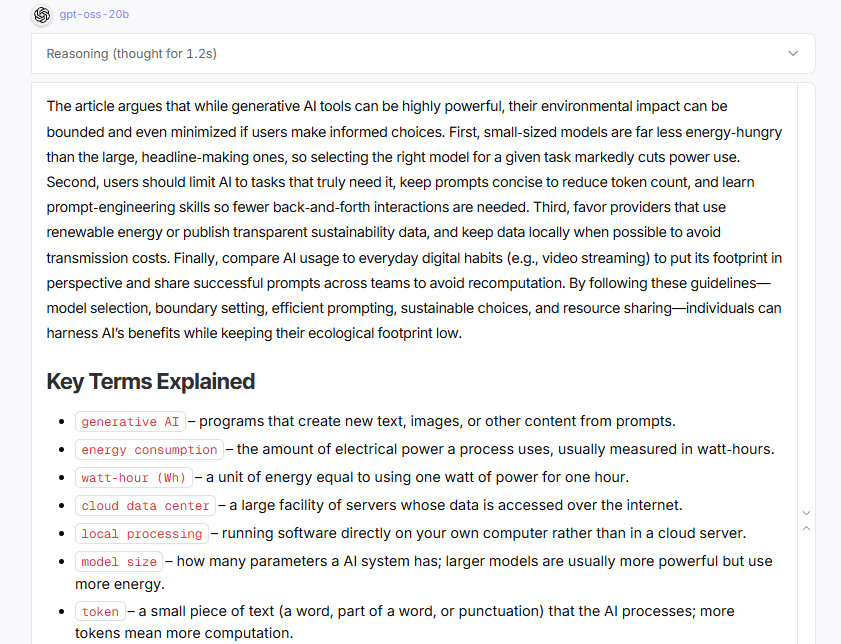
To understand what small models can actually deliver, consider OpenAI's newest addition to the small model ecosystem: gpt-oss-20b, a 20-billion-parameter model now available through OpenRouter. This model demonstrates how far small model capabilities have advanced. When asked to analyze a technical document, it produces coherent summaries, identifies key themes, and maintains logical consistency throughout its response. The output might lack some of the stylistic polish or creative flair of GPT-4, but for straightforward business tasks, the difference often proves negligible.
Here is the prompt I submitted followed by the actual output.
You are an expert communicator who excels at making complex topics accessible. Please summarize the following Substack article for a general audience that may not be familiar with the terminology. Please provide a single paragraph of the main arguments. Following the summary, include a 'Key Terms Explained' section. In this section, list any technical terms from the article, and next to each term, provide a one-sentence explanation in plain, simple language. Use minimal reasoning effort and do not talk -- just carry out the task. Here is the article: [FULL ARTICLE INSERTED HERE]
Here is the response. Notice how the model produces a coherent summary with properly organized key terms, demonstrating that 20B parameters suffice for professional documentation tasks. While GPT-5 might add more stylistic flourishes, the core information extraction is equally effective.
The real test comes from direct comparison. Take a typical task like summarizing meeting notes or extracting action items from email threads. Run the same prompt through both GPT-5 and oss-gpt-20b. You'll find that for these focused tasks, the 20-billion parameter model produces essentially equivalent results in a fraction of the time and at roughly 2% of the cost. This isn't theoretical efficiency; it's practical proof that smaller models have reached a threshold of capability that makes them viable replacements for many routine AI tasks.
The Critical Role of Prompting and Context Management
Small models demand precision where frontier models allow laziness. This isn't a flaw but a fundamental characteristic that shapes how you work with them. While ChatGPT might correctly interpret "summarize this" and produce exactly what you wanted, a small model needs you to specify your audience, desired length, and key points to emphasize. The difference resembles working with an experienced colleague versus training a capable but green assistant. The assistant has the skills but needs clear direction to apply them effectively.
This requirement for explicit instruction extends to context management. Frontier models excel at maintaining context across long conversations, remembering details from dozens of exchanges ago. Small models have shorter attention spans. You'll need to re-establish context more frequently, reference specific information when it matters, and structure your prompts to include all necessary background within the current exchange. Rather than assuming the model remembers your formatting preferences from earlier messages, you provide an example each time it matters.
The precision these models require actually improves your prompting skills overall. You learn to decompose complex requests into clear steps, front-load critical context, and specify output formats explicitly. These practices generate better results from any AI system, but with small models they shift from helpful to essential. Many users discover that the structured thinking small models demand makes their frontier model interactions more productive too. You stop hoping the model understands your intent and start ensuring it does.
For those already proficient with ChatGPT or Claude, the adjustment typically takes a few hours of deliberate practice. You already understand the fundamentals of prompting. Small models simply require you to apply those fundamentals more rigorously. The payoff comes quickly: once you develop the habit of precise instruction and active context management, you'll find small models handle routine tasks with surprising competence at a fraction of the cost.
There are two ways to use small language models: through cloud-based services that run on someone else's hardware, or via local installations that run entirely on your own computer. Local deployment means downloading a model file (typically 4-15GB) and running it through software like LM Studio, Ollama, or Kobold. This requires a decent graphics card (8GB+ VRAM for most models) or Apple Silicon Mac, but provides complete privacy since your data never leaves your machine and costs nothing after the initial hardware investment.
For this guide, I'm focusing exclusively on cloud-based platforms, which let you start immediately without technical setup or hardware requirements. Consider this your entry point into the small model ecosystem. Once you've identified which models serve your needs through cloud experimentation, local deployment becomes a natural next step for those seeking complete data sovereignty.
Why OpenRouter for Cloud Deployment?
My recommended starting point is OpenRouter.ai, which aggregates over 300 models from various providers into a single interface. This consolidation eliminates the friction of managing multiple subscriptions, allowing you to experiment across the full spectrum of model sizes and capabilities. The platform is easy to use, inexpensive, and a very important set of privacy practices, which is worth a few additional words.
Cloud services require you to transmit your data to external servers, which means sacrificing the absolute privacy that local deployment provides. With local deployment, you can run models completely offline. OpenRouter's approach to data handling makes it a reasonable compromise for many use cases, particularly when you're still exploring which models work best for your needs or performing routine work that doesn’t include sensitive or personal information.
Understanding Privacy
OpenRouter maintains a zero data retention (ZDR). This means your prompts and responses aren't stored unless you explicitly opt into their logging feature. This opt-in logging offers a 1% discount on usage costs in exchange for allowing data storage. When logging remains disabled, any sampling done for categorization and reporting happens anonymously.
The platform recognizes that each model provider (OpenAI, Anthropic, Meta, and others) maintains their own data handling practices. OpenRouter provides granular control through its privacy settings. You can filter requests to only use providers meeting specific privacy requirements, accessing a maintained list showing which providers have zero data retention policies versus those that may retain or train on user data. This helps you make informed decisions about balancing privacy needs against model availability.
It's important to note that these privacy considerations don't make OpenRouter suitable for all professional contexts. Research projects with specific security requirements, proprietary corporate data, or information covered by regulatory frameworks may require local deployment or specialized enterprise solutions. But, in my professional work, I have countless tasks where I use OpenRouter, which allows me to switch and compare models easily.
For those wanting to verify these privacy claims, you can find their documentation here:
Privacy Policy: https://openrouter.ai/privacy
Privacy & Logging Documentation: https://openrouter.ai/docs/features/privacy-and-logging
Zero Data Retention Details: https://openrouter.ai/docs/features/zdr
Privacy Settings (for users): https://openrouter.ai/settings/privacy
Terms of Service: https://openrouter.ai/terms
Setting Up Your OpenRouter Account
Creating an OpenRouter account reveals a pricing structure that fundamentally differs from major AI services. Rather than flat monthly fees that encourage maximum usage regardless of actual need, the pay-per-use model makes the true cost of each query visible. This transparency alone can reshape how you think about AI assistance. You become more aware that small models that can easily handle a routine task is a mere fraction of the cost (and environmental impact) as the largest models.
The free tier, current as of September 2025, provides 50 daily requests to designated free models. This allowance suffices for casual experimentation and learning the platform. Purchasing $10 in credits expands the daily free tier allowance to 1,000 requests. You will be surprised how long your credits last with small models. A $10 investment typically provides months of regular use when working with 7- or 20-billion-parameter models. The psychological shift from "I'm paying $20 monthly, so I should use this constantly" to "each query costs a fraction of a penny" fundamentally changes your relationship with AI tools.
Setting up your model
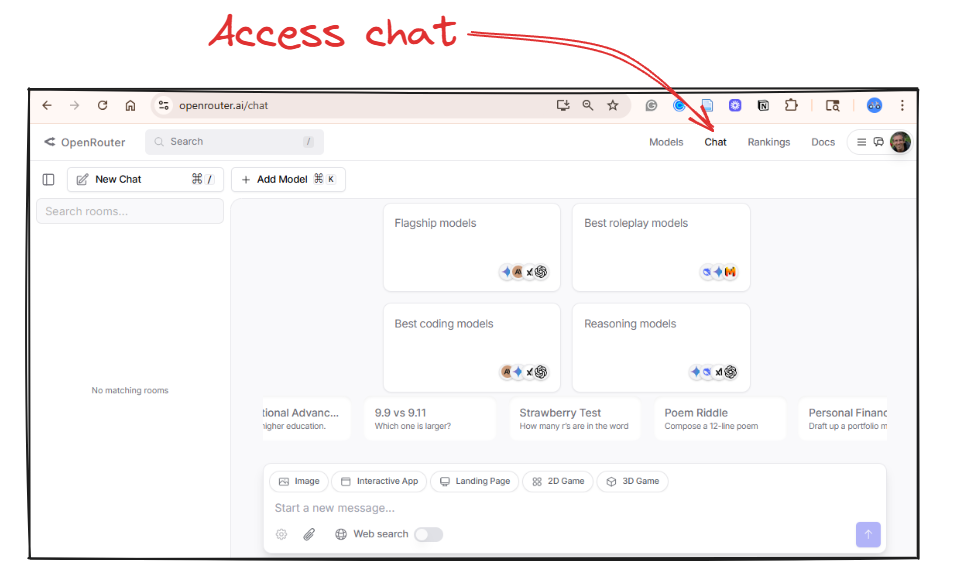
After logging in, navigate to "Chat" to find the familiar message box and conversation history, but with one critical addition: a model selector displaying hundreds of options with transparent pricing. This is where exploration begins. Each model brings its own capabilities and what I call personality—the subtle patterns in how it structures responses, its verbosity level, and its tendency toward formal or casual language. Just as GPT-4 tends toward comprehensiveness while Claude often provides more structured analysis, small models each develop recognizable patterns that become part of your toolkit. Testing different models on identical prompts quickly reveals these differences, helping you match not just capability but communication style to your specific tasks.
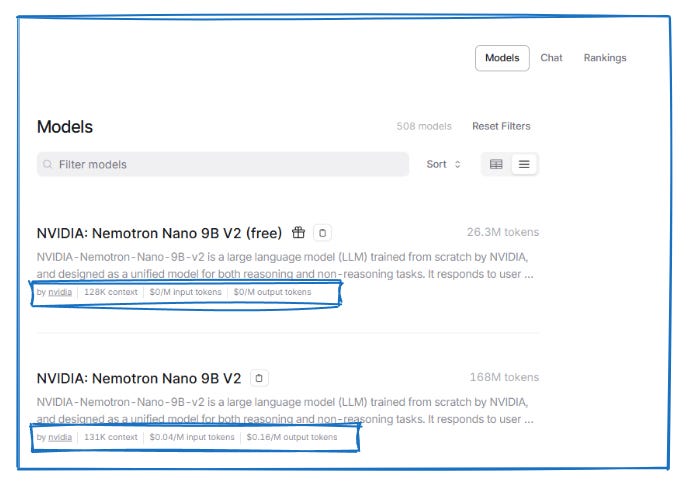
The Models tab, located at the top right of the page, provides detailed information about the various models. This example shows Nvidia's Nemotron Nano 9b model, available in both free and paid tiers. When you exhaust your daily free allocation, you can seamlessly continue using the paid version at $.05 per million input tokens (everything you send to the model) and $.18 per million output tokens (everything the model generates). To put these numbers in perspective: processing a 10-page document costs less than half a penny. Summarizing your entire email inbox for the month might cost a nickel. The entire Harry Potter series could be analyzed for under ten cents. At these rates, your typical daily work with AI might cost what you'd pay for a few seconds of mobile data. The pricing transparency reveals how choosing appropriately sized models transforms AI from a luxury subscription into a utility as cheap as any other digital tool.
Based on my experience testing dozens of these models, here are specific recommendations to begin your exploration. Each model has its own unique performance characteristics that become apparent only through direct use. The same prompt might produce concise, technical output from one model and verbose, conversational responses from another. Some models excel at maintaining structure across long outputs, while others generate more creative variations. These differences aren't necessarily strengths or weaknesses but rather characteristics you'll learn to match to your specific needs.
Start with this range of models to understand the performance spectrum:
Qwen3: 4b, 8b, 14b, 30b A3b, 32b (try multiple sizes to see how performance scales)
OpenAI: gpt-oss-20b (includes visible reasoning process)
Mistral Ministral: 8b and Mistral Small 3.2: 24b (compare output styles)
Nvidia Nemotron Nano 9b (consistently efficient)
Llama 3.3: 8b Instruct and Llama 4 Maverick (different training approaches)
Test these models with your actual work tasks rather than generic examples. Submit the same email draft request to three different models. Ask each to summarize the same document. Have them generate similar code snippets. You'll quickly discover that one model's directness suits your technical documentation while another's elaborative style works better for client communications. This empirical approach beats any prescriptive guide because your specific use cases, writing style, and quality requirements ultimately determine which models serve you best.
The model ecosystem evolves rapidly, and OpenRouter's portfolio changes regularly, so treat these suggestions as a starting point rather than definitive recommendations. The goal isn't finding the "best" model but building a toolkit where you know exactly which model to reach for when you need quick summaries versus detailed analysis or creative brainstorming.
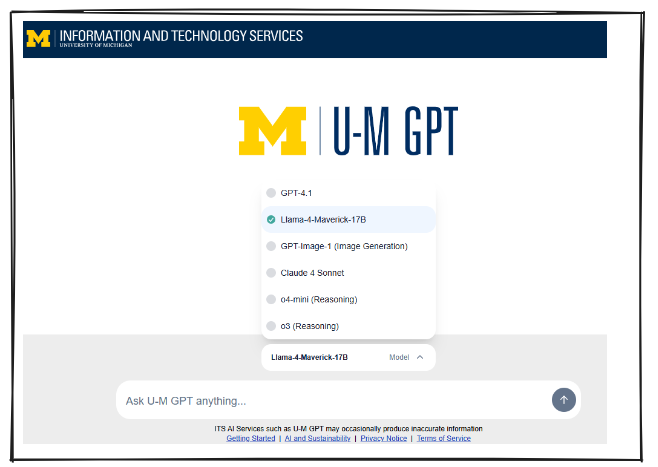
Worth noting: many universities now provide their own AI platforms with small model access. At the University of Michigan, for instance, the Llama 4 Maverick (17b) model is freely available to students, staff, and faculty through the institutional platform. You simply need to change from the default model selection. Check whether your institution offers similar resources, and if small models aren't available, advocate for their inclusion. The combination of educational access and environmental responsibility presents a compelling case that administrators are increasingly recognizing.
Next steps
Your journey with small models starts with a single query. Consider trying OpenRouter. Create an account, select one of the recommended models, and test it against a task you currently handle with ChatGPT or Claude. Compare not just the outputs but the speed, cost, and resource consumption. Notice where the small model surprises you with its competence and where it reveals its limitations. This direct experience will teach you more than any article could convey about the practical boundaries between sufficient and excessive computational power.
Building proficiency with small models requires deliberate practice across three dimensions. First, develop your prompting skills by experimenting with context provision, few-shot examples, and task decomposition until you can reliably extract quality outputs from models with limited parameters. Second, map different models to specific use cases in your workflow, discovering which 8-billion parameter model excels at code generation while another handles document summarization with unexpected grace. Third, track your usage patterns and costs, gathering concrete data about how much computation your actual work requires versus what you've been consuming through habit.
The natural progression leads toward local deployment, where small models reveal their full potential. Running a model on your own hardware transforms the entire relationship with AI tools. Your data never leaves your machine, eliminating privacy concerns that constrain professional use cases.